Update It Bro is a New Tech Blog on Web. With Your All Support and Love We will be India's Leading Technology Site. We Publish Top News for Technology, Security, Gaming, Apps, and Many Many More.
Your next iPhone will be even better at guessing what you want to type before you type it. Or so say the technologists at Apple.
Let’s say you use the word “play” in a text message. In the latest
version of the iOS mobile operating system, “we can tell the difference
between the Orioles who are playing in the playoffs and the children who are playing
in the park, automatically,” Apple senior vice president Craig
Federighi said Monday morning during his keynote at the company’s annual
Worldwide Developer Conference.
Like a lot of big tech companies, Apple is deploying deep neural networks,
networks of hardware and software that can learn by analyzing vast
amounts of data. Specifically, Apple uses “long short-term memory”
neural networks, or LSTMs. They can “remember” the beginning of a
conversation as they’re reading the end of it, making them better at
grasping context.
Google uses a similar method to drive Smart Reply,
which suggests responses to email messages. But Apple’s
“QuickType”—that’s what the company calls its version—shows that not
only is Apple pushing AI onto personal devices, it’s pushing harder than
Federighi let on.
Today, on its website, Apple also introduced an application programming interface,
or API, that lets outside businesses and coders use a similar breed of
neural network. This tool, Basic Neural NetworkSubroutines, is a
“collection of functions that you can use to construct neural networks”
on a wide range of Apple operating systems, including iOS as well as OS X
(for desktops and laptops), tvOS (for TVs), and watchOS (for watches),
according to the documentation. “They’re making it as easy as possible
for people to add neural nets to their apps,” says Chris Nicholson, CEO
and founder of deep learning startup Skymind. David Paul Morris/Bloomberg
For now, BNNS looks better at identifying images than understanding
natural language. But either way, neural networks don’t typically run on
laptops and phones. They run atop computer servers on the other side of
the Internet, and then they deliver their results to devices across the
wire. (Google just revealed that it has built a specialized chip that
executes neural nets inside its data centers before sending the results
to your phone). Apple wants coders to build neural nets that work even
without a connection back to the ‘net—and that’s unusual. Both Google
and IBM have experimented with the idea, but Apple is doing it now.
It might not work. Apple doesn’t provide a way of training the neural
net, where it actually learns a task by analyzing data. The new Apple
API is just a way of executing the neural net once it’s trained. Coders,
Nicholson says, will have to handle that on their own or use
pre-trained models from some other source. Plus, no one yet knows how
well Apple’s neural nets will run on a tiny device like a phone or a
watch. They may need more processing power and battery life than such
devices can provide. But that’s all details; one day, neural nets will
work on personal devices, and Apple is moving toward that day.
Apple unveiled iOS 10 at its WWDC keynote today, and might be the most feature-packed update to its mobile OS ever.
First up, iOS 10 will be able to preview your notifications by simply
raising your phone. It’s somewhat akin to Motorola’s Active Display,
except you actually have to move your phone. Tons of Android phones do
something of the sort, but it’ll be nice to have for team Apple.
Meanwhile, you can use 3D touch to do things like interact with
notifications, even from the lock screen. You can have a full
conversation in chat apps without ever unlocking your phone, check full
sports updates, or view a map preview of where your Uber is.
The idea is that you can use 3D touch to perform immediate actions,
instead of waiting through the usual loading process and mish-mash of
UIs while switching between apps.
Another Android-esque lockscreen feature: swipe to the right to
access your camera (innovation!). You can also swipe left to view your
widgets, if you still use those.
The control center is getting a slight refresh with a cleaner look too, with a dedicated pane for audio.
Siri has been opened up to third-party apps,
meaning that it can tap in to performing actions within specific apps
such as “Send a WeChat to Nancy.” Other integrated apps include WhatsApp, Slack, Uber, Lyft, Pinterest, Square, Skype and more.
iMessage is getting its biggest update ever,
and it’s surprisingly similar Google Allo. You can see rich link
previews for images and video and emoji are now huge. You can also now
animate your messages to reflect your feelings, for example a shout for
when you need to be loud, or a whisper for somber messages.
There’s also an ‘invisible ink’ feature to hide your messages until
they are swiped over for a bit more privacy, and people can now react to
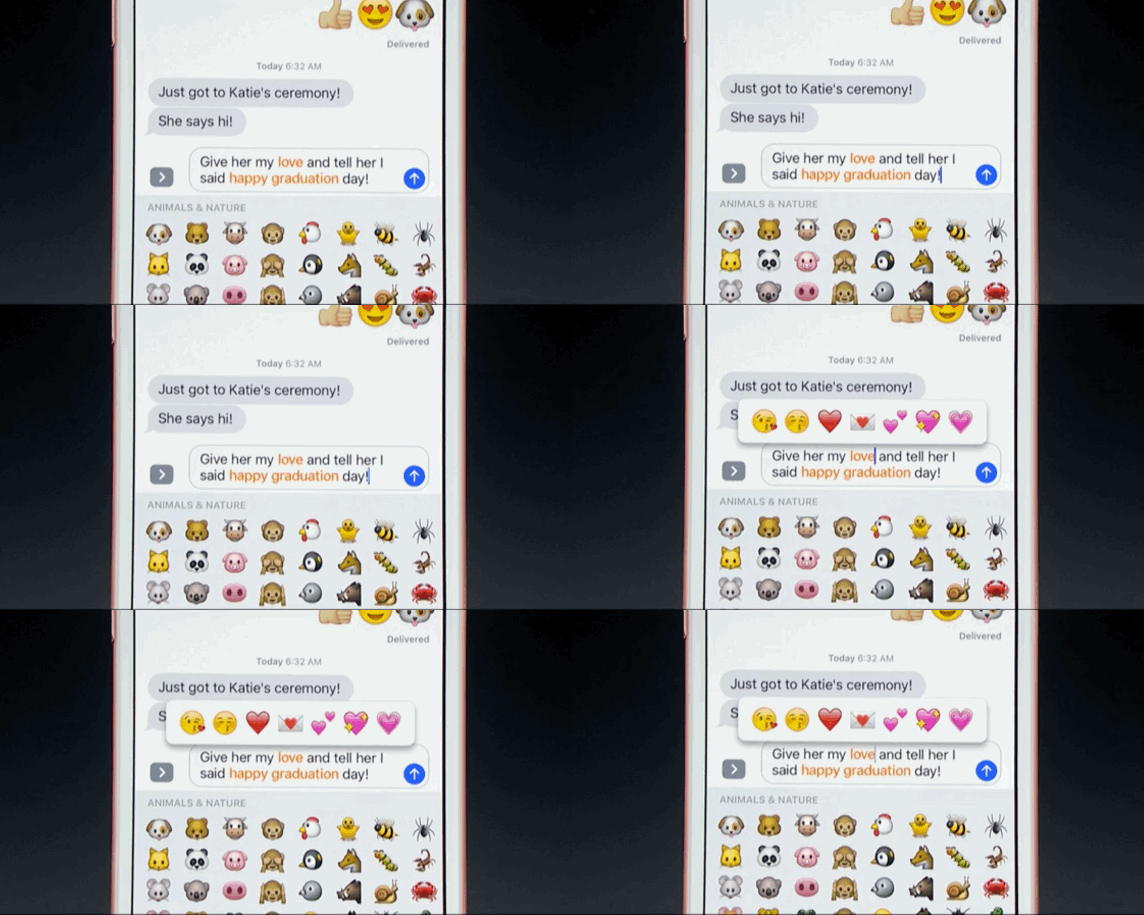
posts just like on Slack. My favorite feature though is the advanced
emoji keyboard – you can tap on words to turn them into emoji. The
handwriting feature (another one in Allo) is pretty neat too.
Like Siri – and, again, Allo – iMessage has been opened up to third
parties, although it’s less conversational than Google’s approach, as
Apple seems to be focusing less on bots. Instead, it’s more
like Facebook Messenger, including its own app drawer and app store
section.
Apple announced a bevvy of other features for iOS 10 , so we’re just going to list some of the more notable ones.
Apple Photos is basically now Google Photos,
including machine learning to analyze your pictures and automatically
create slideshows, and a ‘Memories’ feature for looking back at old
images.
Apple Maps borrows heavily from Google Maps, including traffic previews during navigation and information on gas and food stops while you’re on route.
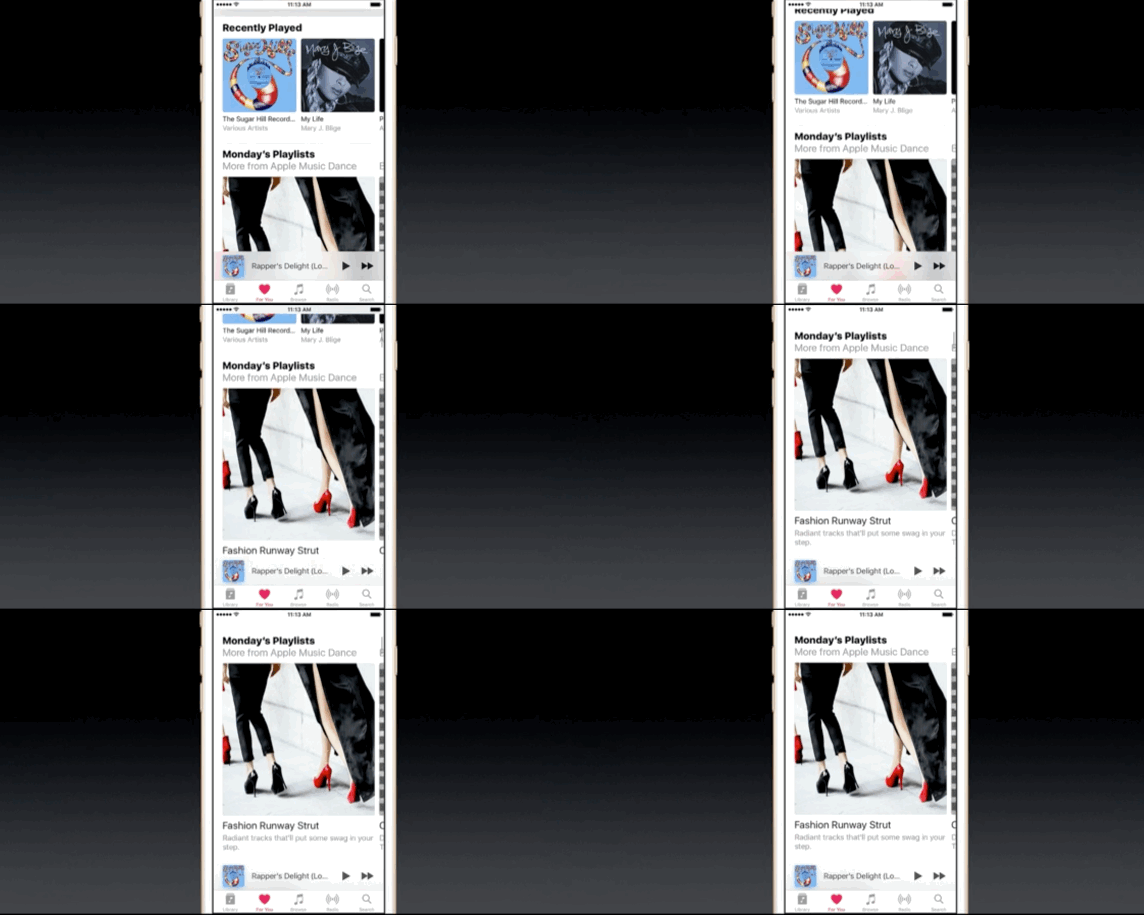
Apple Music has a cleaner interface, and now includes lyrics.
Apple News has also been redesigned, pulling in content from
third-party apps. You can also pretty much read any article from the
lockscreen by – you guessed it – 3D touch.
There’s a new ‘Home’ app that can control all your HomeKit devices from a single spot. It also lives in the control center.
Voicemail messages are now automatically transcribed.
Split View now works in Safari on iPad
You can collaborate on Notes
Live photos can be edited and are stabilized.
And that’s just a brief summary. There are a lot of ‘me too’ features
seemingly copied over from Android or even Windows 10, but with Apple’s
traditional sense of polish, perhaps there’s more than meets the eye.
Expect us to dive deep when iOS 10 rolls out later this year.
It’s official: OS X is now macOS, and it’s being tagged as ‘Sierra.’ With continuity, Apple is adding auto-unlock. Instead of having to type a password, you can use an iPhone or Apple Watch to authenticate a Mac.
There is also a universal clipboard feture. Text copied on your iPhone can now be pasted on a Mac.
Apple is also optimizing storage on Macs by offloading older files to
iCloud when you’re running out of space on your computer. If you have
files you know you won’t need, like redundant email stuff, Apple will
also manage that by destroying your junk. Apple says it saw a 5x
improvement in available space.
Apple Pay is also coming to the Mac via the Web. When you shop
online, a ‘pay with Apple Pay’ button lets you authenticate a purchase
on your iPhone using Touch ID.
Your messy tabs are also getting cleared up with support for third
party apps, and developers don’t need to do a thing. It’ll happen
automatically.
If you like watching video on the Web, and videos go picture-in-picture so you can keep working across apps.
Siri!
And as expected, Siri is coming to the desktop. It’s the same
experience you’ll find on your phone, more or less. She’s housed in the
Dock as well as the Menu Bar.
Of course, she’ll have some insight into your Mac, and it’s mostly
the same as you’ll find in Spotlight search. So, if you ask Siri to open
up a file, she can; it just saves you the step of looking things up in
Spotlight.
Interestingly, you can pin your recent Siri searches to the notifications bar.
Siri can also search the Web — just like on the iPhone. The neat
trick there is that you can drag things like pictures into a document or
a app like Notes. You can also message people with voice.
Developers can access macOS Sierra today, and the public beta is launching this Summer.
Apple
opened up WWDC with details on the latest operating system for the
Apple Watch, watchOS3. Overall, today’s focus was on speed and a more
iOS-like experience for apps and navigation.
To start, the newest watchOS is 7x faster than its predecessor. The
lag experienced when launching apps and waiting for it to connect, and
then update is gone. Instead, the app now refreshes in the background so
it’s available instantly when you want it.
The focus on speed didn’t stop with making apps load faster.
Apple also introduced a handful of new features designed to allow you
to navigate watchOS at lightning speed and complete tasks faster than
ever before. Two of these new features were obviously inspired by other
Apple products — a dock-like interface and a new control center. Now,
instead of finding and opening apps like in watchOS 2, you can add
favorites (or oft-used items) to a dock, much like you would on your
MacBook. The control center adds quick icons for easier (and faster)
task-handling, just like on the iPhone and iPad.
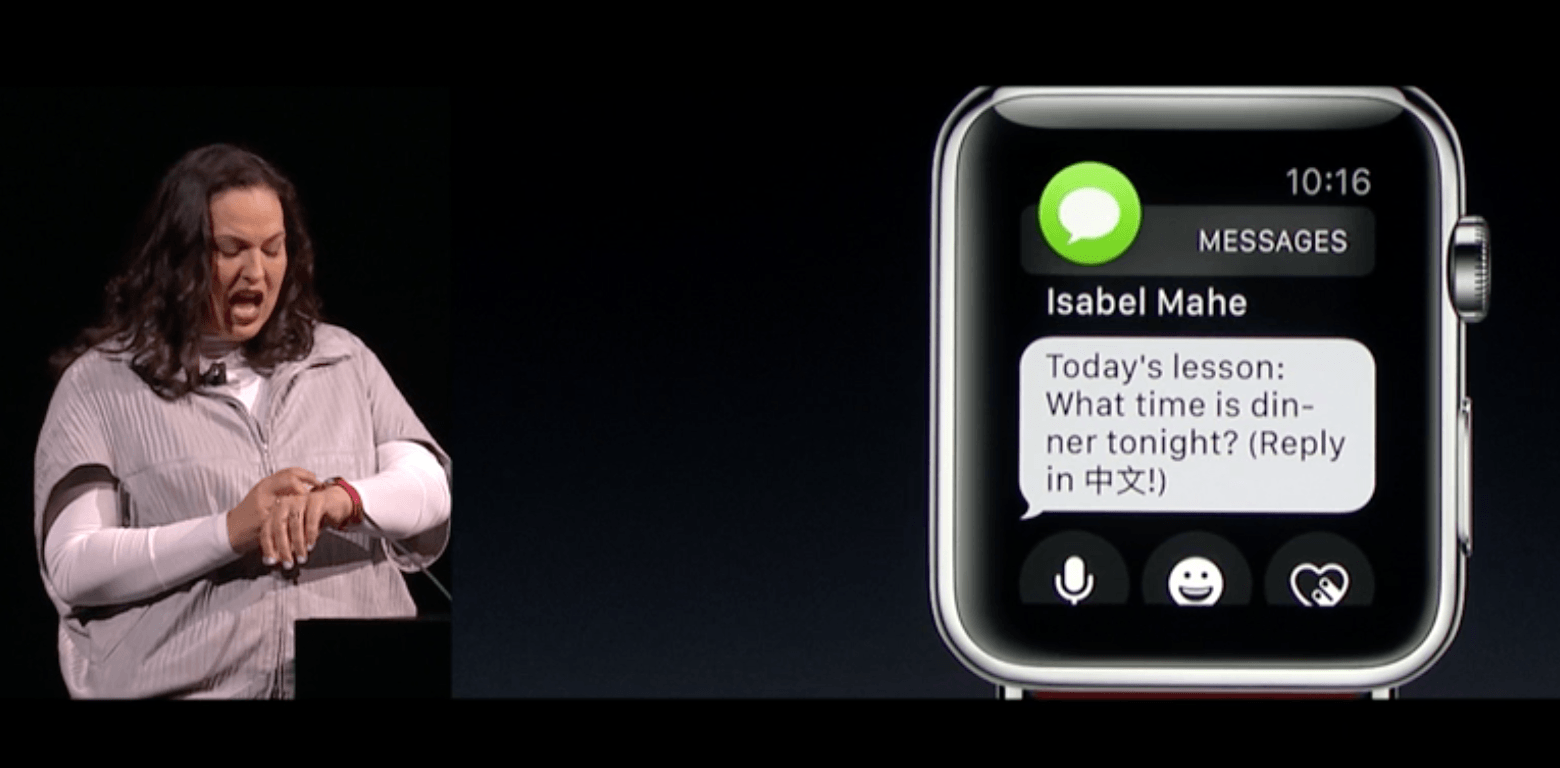
Apple also brought speed updates to the way you handle Messages. Now,
Messages have the option to use ‘smart replies’ to quickly respond
using a few canned responses that Apple deems appropriate based on the
text of your message. You an also quickly add your own with a new
handwriting feature, ‘Scribble,’ that allows you to scribble letters,
one on top of the other, to respond.
You can even dial 911 faster, if needed. Apple added the ability to
press and hold the side button to call 911 (or your country’s
equivalent) should the need arise.
Last, but certainly not least, Apple announced a new API that brings
Apple Pay to watchOS to allow for on-the-go payments without needing to
grab your phone at the pay terminal.
This year’s keynote from Apple’s Worldwide Developer Conference is
a wrap – but if you missed it, here’s a recap of the important bits you
need to know. For more details on each news item, click the links below
for an extended coverage. Kicking off the keynote, Apple CEO Tim Cook opens with a moment of silence to honor the victims of the shooting at a nightclub in Orlando on Sunday night. And then, we start.
iOS 10
Updated iMessage app
will be able to suggest emoji, send a range of new playful messages,
and is open to third party apps for paying and shopping within messages
Siri will be opened up to third-parties, giving it the power to send a WhatsApp, order an Uber, and so on
Alongside
a revamp for stock apps such as iMessage, Maps and Photos, users can
now delete the default apps to save homescreen real estate
Apple Music has been rebuilt with a cleaner, more intuitive design that takes cues from the old iTunes app and Spotify
Other functions include the phone lighting up to display notifications when you pick it up, and widgets for the lock screen
This is "the biggest iOS release ever for our users," said Craig
Federighi. He notes there are 10 major new features in the new OS. The
highlights include a redesigned lock screen with rich notifications,
quick interactions with apps, and expanded use of 3D Touch.
- A new "Raise to wake" feature will, as the name suggests,
wake the phone's lock screen when it's lifted to give you an overview of
notifications and updates. The new notifications look significantly
different and, with the use of a 3D Touch, you can respond to and
interact with the app sending them immediately. This is very much in
line with what Google's been doing with Android.
- The expansion of 3D Touch on the home screen includes widgets for apps
that don't require you launching the app at all. You'll be able to see
things like the latest sports scores with the ESPN app, and even get
into video highlights, without entering the app proper.
macOS
Macs have full Siri integration in the renamed macOS, including
file and internet search, and the ability to play music and make calls
Apple Pay comes to the web, meaning that you can pay for things in
Safari using your iPhone's TouchID or Apple Watch, which can also be
used to unlock your computer
Greater integration with other Apple devices through an iCloud Drive update, and new Universal Clipboard feature
The latest OS version will be called Sierra, with a focus on
continuity. For example, if you’re wearing an authenticated Apple Watch,
you can automatically unlock your laptop just by having that watch
nearby. It’s a neat little feature… if you own all the right Apple gear.
There’s also Universal Clipboard which lets you copy text from your
iPhone and paste on your Macbook, and an iCloud Drive to help offload
older files to make room for local documents.
OS X Sierra brings Apple Pay to desktop as well, with a new payment
feature that lets you authenticate the payment through your Apple Watch
or iPhone via continuity. Again, great for someone who has all the Apple
gadgets.
A few more organizational updates bring tabs to any apps, picture-in-picture capacity, and – yep – Siri on desktop. She’ll be available right on the dock.
Apple Watch, watchOS 3
Apple Watch gets a writing feature called ScribbleCredit:
Getty
Apps on the Apple Watch will update automatically in the
background, meaning they will open seven times faster than they
currently do
"Scribble" means you can now reply to messages on the Watch screen by writing out each letter at a time
The Watch interface and apps will also get updates, and will support Apple Pay
The Apple Watch is the company’s latest hardware pillar, so it’s no
surprise that it started the keynote with this platform. In an upcoming watchOS 3 update, app load speeds are up to seven times faster, and there is a new dock feature and control center like on iOS.
There are also new quick reply buttons with pre-written responses, as
well as “Scribble,” a handwriting support app. It even works in
Chinese!
In case of emergencies, there’s now an SOS mode that allows you to
hold the side button to call 911. If you’re in an international city,
holding SOS will also call the correct local emergency number (i.e. 999
in Hong Kong).
There are several new health apps as well, such as a breath
meditation program and a wheelchair-friendly mode to promote regular
exercises for handicapped users.
Oh, and Minnie Mouse is now available as a watch face in addition to Mickey from last year. Innovation, y’all.
The update is coming for free to general consumers this fall.
Apple TV , tvOS
Apple TV can now be controlled using an Apple TV Remote app, and an MFi game controller in addition to the Siri Remote
Enhanced search through Siri
Dark mode for the menu screen
Single sign-on for Apple TV and the apps saved to it
“The future of TV is apps” That what Eddy Cue, Apple Senior Vice
President of Internet Software and Services said about Apple’s tvOS at
last WWDC, when it introduced third party development on the device. The
platform has since increased its video channels offerings from 80 to
1,300.
With this year’s update, there will be a new remote app in case you
misplace the physical remote or need more remotes for multi-player
games.
If you hate syncing your cable account to access live TV or video on
demand on the Apple TV, the new tvOS has a single sign on mode that lets
you log in once to access all the channels available from your cable
provider.
Swift Playground
You didn’t think we’d get away with WWDC without mentioning Swift, right? Apple introduced Swift Playground,
a new iPad app to help kids learn how to code in Swift right from the
iPad. The game-like app lets you learn different principles, like loops
or turning specific features (such as gravity or gyroscoping) on and
off.
Cook thinks it will help make learning more accessible to millions
around the world, but of course that’s provided you can afford to buy an
iPad to start.
Swift Playground will arrive with the developer preview today, and
will arrive with the public beta and general public with the same
timeline as iOS 10. The app will be free to download.
Photos, Maps, Music, News, Home, Phone
For Photos, you’ll be able to see a map-view of where your photos were taken Instagram-style, and Apple will incorporate facial recognition to sort through who’s in your images, Google Photos-style. It’ll also start creating movies based on photos you took during a recent period of time, if you’re into that kind of thing. With Maps,
there are new recommendation shortcuts for you to find exactly what you
want from Maps, such as cuisine types in a restaurant search mode. You
can also search for nearby stops on a map route such as a gas station or
restaurants and see how long it’ll take to detour over there.
Maps will be open to developers, too. For example, now you can book
your dinner reservation from the map through a third party app like
OpenTable, then book a ride to go there all via Maps. For Music, Eddy Cue says it will get redesigned from the ground up
with larger photos, and better tabs to find music you’ve recently added
or music you’ve downloaded. There’s a lyrics tab and a daily-curated
playlist too, Spotify-style. Hmm, looks like there is an ongoing trend
for this keynote.
News
gets a redesign too, which shares the same aesthetic as the new Music
look with the giant font to separate each sections. You can now
subscribe to newspapers and magazines from the News app as well. HomeKit gets a new Home app
so you can control all your internet of things gear. You can even say
good morning to Siri so she can set the house ready for you to get
going. If someone rings a doorbell, you can get a notification, view a
livestream of the front door, and unlock right from the homescreen.
And get this: If you’re the kind of person who uses your smartphone
to actually make phone calls, now you can get voicemail transcriptions!
Third party providers can also help detect spam phone numbers to avoid
picking up annoying calls. VoIP can be integrated into the lockscreen,
too. iMessage gets a fun update with
invisible ink, letting users tap to unblur a new photo or text. There
are new text stylizations that lets you add animations as well, such as
“smash,” “gentle,” or “loud.”
Emoji get supersized too – three times bigger in fact – and iMessage
can recommend emoji to use or turn all your words into an emoji. What a
time to be alive.
As you may have anticipated by now, Messages are open to devs, too.
The developer preview for iOS 10 will be available today, and a
public beta will come out in July. The public rollout will arrive in the
fall.
Apple’s WWDC this year was full of incremental updates to OS’s for the
Mac, iPhone, Watch, and TV, as well as moves to open up services like
Siri and iMessage to developers. A lot of the changes were geared toward
moving between Apple devices easier — Siri is now on desktop, and Apple
Pay will now work on Safari, for example. There were also a bunch of
redesigns: new notifications and lock screen interactions for iOS; a new
command center for the (faster) Apple Watch; and changes to Apple News,
Music, Maps, and other services.
macOS - New Name , More Continuity Across Devices , Siri
OS X is now macOS,
and this iteration will be called Sierra. The public beta will launch
in July with the final version coming in the fall. One of the big
focuses of the new OS is continuity across devices. Craig Federighi
demonstrated a feature called Universal Clipboard, which allows users to
copy and paste across multiple Apple devices. You can also save your Mac desktop to the cloud and access it from a different computer using iCloud drive.
There are other smaller updates as well, including a storage-saving
measure that moves old files to the cloud and a way to unlock your Mac
using your Apple Watch.
Sierra will also bring Siri to the desktop.
Siri will be accessible in the dock as well as in the top-right corner
near Spotlight. You’ll be able to use voice commands to find files,
search the web, send messages, and other standard Siri functions.
Apple pay is coming to the web
You’ll be able to use Apple Pay
to make payments online through Safari. Authentication will work
through TouchID, either through your phone or Apple Watch, eliminating
the need to type credit card details. Apple Pay is available in the US,
UK, Canada, Australia, and Singapore, and will be rolling out to
Switzerland, France, and Hong Kong.
The apple watch gets faster and ADDS new features
watchOS 3 brings a host of updates, but perhaps most
importantly, it loads apps seven times faster than the previous OS,
thanks to background refreshing and keeping apps stored in memory.
Navigation supposedly will be easier on the new OS, too. The side button
can be used to access a "dock," which allows wearers to scroll through
their apps, and the Watch will act a little more like an iPhone with a
new Control Center. A swipe up on the Watch allows wearers to quickly
switch into airplane mode or Do Not Disturb, just like the iPhone.
Other
new features include a keyboard called "Scribble" that wearers can use
to respond to a message. Instead of typing or dictating a response, they
can draw out each individual letter. It works in either English or
Chinese. Apple Watches will also come with a new SOS feature, which
activates when the side button is held down and calls 911 and sends
location information to first responder and emergency contacts. It'll
also share users' medical ID, which displays their allergies, age, and
existing medical conditions. The feature works internationally and will
call country-specific emergency numbers, so long as the watch is
tethered to a phone or is connected to Wi-Fi.
Apple emphasized fitness with the introduction of new
activity-specific watch faces, a meditation app called "Breathe," and
activity sharing to view friends' fitness levels.
iOS gets a slew of updates
Craig Federighi called the iOS changes "the biggest iOS release ever for our users," including complete redesigns for Music and Maps,
new notifications, and an expanded role for 3D Touch. A new feature
called "raise and wake" will wake the lock screen when you lift your
phone, revealing redesigned notifications that you can interact with
using 3D touch.
Apple news gets a redesign and supports subscriptions
Apple News now features over 2,000 publications
and over 60 million monthly readers. Apple is rolling out an all-new
design that features clear sections, including Top News, Trending, and
Sports. The app pulls together new sections based on your reading
habits, and includes a Featured Stories section with editor picks. Apple
News now also features subscriptions, which means you can subscribe and
read full newspapers and magazines from the app. It will also send
breaking news notifications and deliver them to your lock screen.
Apple music gets a discover playlist and a complete redesign
After
only a year of existence, Apple Music is getting a complete redesign.
New sections make it easier to navigate, including one section for
downloaded music and another for recently added songs and albums. Apple
also appears to be coming directly for Spotify with its new "discovery
mix" that tailors a playlist to listeners’ tastes. There will also be
daily curated playlists and new sections to help users find new music
curated by Apple’s music editors. You can also read song lyrics now.
Maps is Redesigned with Navigation in Mind
Maps
is getting a whole new feel. Its redesign will show more of a map when a
user opens the app. Users can also book rides through Maps, pay for
them with Apple Pay, and make restaurant reservations. Navigation is
getting easier too, with directions that include traffic. Maps is also
coming to CarPlay, which will show traffic and offer alternative routes,
as well as precise navigation right from a car’s display.
Messages Get snazzier
Apple is revamping iMessage to include bigger emoji
as well as suggestions for turning certain keywords into emoji. People
can share songs directly from Apple Music and write notes to one another
in their own handwriting. There are animated effects — like strobe
lights, balloons, and confetti — and invisible ink hides messages until
they’re swiped over. Invisible ink! Developers are also getting access
to Messages and can develop apps like stickers. iMessage is turning into
some kind of Snapchat-WhatsApp-Facebook Messenger conglomerate.
Photos takes on google photos
Photos
is being updated with new features to help you organize and manage your
collection. You can organize your collection automatically by person
using facial recognition. The app is also adding Memories, which bundles
together photos according to events and locations. You can also create a
montage set to music automatically from Memories, much as you’re able
to do in Google Photos.
Voicemail transcription comes to iOS 10
iOS 10 will now feature voicemail transcription, which will
automatically transcribe voicemails and offer them up like texts. In
addition, iOS is taking on spam calls: the iOS will support APIs that
can alert you to possible spam calls and warn you before you pick up.
With VoIP, you’ll be able to see caller ID right on the lock screen.
tvOS is all grown-up
tvOS is less than a year old but
now hosts 1,300 video channels and over 6,000 apps. That library is
going to be expanding shortly: Dish’s Sling is coming to tvOS today; Fox
Sports Go is coming later this summer; and Molotov, a French TV
service, is coming next month. Apple is rolling out a new Apple TV
remote app, which will have all the functionality of the... Apple TV
remote. You’ll be able to use touch for navigation, Siri for voice
command, and the phone’s built-in sensors for gaming control. Plus,
you’ll have your trusty keyboard. Siri will now be able to search
through the service’s 650,000 movies and shows, as well as live channels
by name or category ("German high school comedy from 1962, please").
You’ll also now be able to use Siri to search in YouTube.
Apple’s also introducing a single
sign-on system that lets your log into all of the network apps at once.
You’ll have a page that shows you all the channels you have access to.
Download a channel app onto your phone, and it’ll automatically appear
on your tvOS. Seamless integration, folks.
And Apple quickly introduced two kits for developers: ReplayKit,
which lets you live broadcast gameplay or save it for later, and
HomeKit, which will let you control all the devices in your house,
including tvOS. tvOS will roll out in a free upgrade this fall.
Siri is opening up to app developers
Siri,
which now services over 2 billion requests per day, is now opening up
to developers. That means you’ll be able to ask Siri to send a message
through WeChat, ask it to call an Uber, search for photos on Pinterest
and start and stop your workout apps all with voice command.
What's next
WWDC was packed with updates, many of which seem minor on
their own, but taken together could make it easier navigate Apple’s
ecosystem. With the Watch, incremental changes in speed and the command
center could go a long way toward making it a more appealing device, and
the new HomeKit hub could make connected appliances more attractive. It
remains to be seen how well all these services work outside the Apple
ecosystem, and whether opening up things like Apple Pay and Siri will be
enough to surmount the lead of companies like Amazon, which has been
aggressive about forming partnerships and developing frictionless ways
to purchase. And of course, we’ll still be waiting for the Apple car.