About Update It Bro

Update It Bro is a New Tech Blog on Web. With Your All Support and Love We will be India's Leading Technology Site.
We Publish Top News for Technology, Security, Gaming, Apps, and Many Many More.
Showing posts with label Business. Show all posts

NeoKylin: China's Linux OS that Seriously Looks Like Windows XP

 China has planned to eliminate all foreign Technologies and Services by 2020, just like Google and Facebook.

And it seems China in some years would be an entirely independent IT economy; building homegrown Mobile and computer devices, Operating Systems, Applications, Browsers and almost everything existing in the IT ecosystem.

Well, China was not at all happy when Microsoft finally announced the end of official support for Windows XP. At the time, Windows holded 91% of total market share, compared to just for Mac OS X and just 1% for Linux.

However, China wasn't interested to pay either for extended support for Windows XP or for switching to Windows 8. So, they decided to develop their own Operating System.

Yes, China has developed a Desktop Operating System named “NeoKylin” (and ‘Kylin’ in Chinese), tagged as a substitute to Windows XP by Quartz, who got an opportunity to have a hands-on experience of its “community version” OS.

NeoKylin is developed by Shanghai-based China Standard Software Company and already running on more than 40% of commercial units sold in the country by Dell.

NeoKylin Looks Like Windows XP
NeoKylin looks something like this:

NeoKylin, the Microsoft Windows XP replacement is similar in the following manner:

    The complete user interface and essentials like Window’s control, XP’s classic start button and folder’s icon are exactly the same.
    The folder names used are also same like: there’s a Recycle Bin, My Computer and Control Panel to name a few.
    NeoShine Office Suite offering similar functionalities of Windows Excel, Word and PowerPoint.

The classic rolling-hills-and-clouds desktop Wallpaper as was in XP gets a new face with qilin, the mythical chimera-like beast that the OS is named after.

NeoKylin has Built-in Linux Terminal

Moreover, the Chinese OS has something more on board i.e. Linux terminal.

Yes, the Linux terminal also exists where commands can be run, and information about the OS can be captured from it.

Beware! It is Not an Easy Going OS

While exploring NeoKylin, Quartz found out that it has certain restrictions which does not allow any third party installations on the system.

The operating system comes with pre-installed applications like:

    Firefox for web browsing
    A music player
    An open-source image editor GIMP
    A calculator


Though besides this, the version on Dell systems is packed with more applications and games.

However, while trying to install Google Chrome, NeoKylin pushed the installation backwards. Moreover, according to Quartz “It wasn’t just Chrome”.

However, with the availability of Yellowdog Updater, Modified (Yum) package management, a commoner in Linux allowed additional program installations.

To Push Windows 10 in China, Microsoft Partners with Baidu

China’s dodgy intentions on not installing Windows 8 raised a few eyebrows, some said because Windows 8 is expensive while some also said because of suspicion over American spying; reason why Windows 8 couldn’t make a landing in China.

China has always been cautious about the IT infrastructure of their country, even after updates and supports are closed 14-year old Windows XP is still in use in the majority of the systems in the country.

Though a few percentage of Chinese Government also use Windows 7, now that percentage might get drop too after the availability of their native OS.

China has always believed in accepting things on their terms and conditions. This proves correct with their recent teaming up with Microsoft with the goal of pushing Windows 10 in China, but…

...Microsoft Edge will be having Baidu, the domestic search engine of China instead of Microsoft Bing.


C++17: New Features Coming To 33-Year-Old Programming Language

C++17: New Features Coming To 33-Year-Old Programming Language
c++17 programming language The C++17 standard is taking shape and adding new features to the vintage programming language. This major update aims to make C++ an easier language to work with and brings powerful technical specifications.

If you are fond of the relatively newer programming languages like Apple’s Swift, you might be too comfortable calling C++ a bloated programming language. To tackle such questions and improve the support for large-scale software, C++17 is expected to ship in 2017.At the recent standards meeting in Oulu, Finland, the actual and final features list of C++ has been finalised. As a result, C++17 has become a major release just like C++98 and C++11.

The new C++ 17 standards are introducing new features like structured bindings and if initialisers, making this vintage programming language “feature complete”.
The C++ community is calling C++17 the start of a new era that will bring powerful technical specifications. The non-C++17 features will be released later as add-ons in future releases.
Here’s the list of the most notable features that were voted at the meeting:
  • C++17 is based on C11
  • Dynamic memory allocation for over-aligned data
  • Guaranteed copy elision
  • Forward process guarantees (FPG)
  • Structured bindings
  • if (init; condition) and switch (init; condition)
  • constexpr if
  • Inline variables
  • A weaker version of fixed order-of-evaluation for expressions
  • Template argument deduction for class templates
You can head over to Reddit to get the full details of the new changes coming with C++17.
I know it’s possible that many people were expecting more. But, to me, this feature list that consists of parallel algorithm libraries and fold expressions looks very impressive to me.
Overall, C++17 is a major update that consists of tons of smaller features that are expected to help make this language more readable.

Source : fossBytes

Google is Working on Its Own Android smartphone To Beat Apple’s iPhone

Google is Working on Its Own Android smartphone To Beat Apple’s iPhone
Google is Working on Its Own Android smartphone

As we know, there are many reports popped up previous year mentioning that Google is interested in building its in-house smartphone. So recently, Google seemed to be releasing its own smartphone to give a tough competition to Apple’s iPhone which is expected to be launched by the end of 2016 
Have you ever asked the question, why Google doesn’t build its own smartphone to take on Apple’s iPhone? The company has its own Nexus series to showcase the best of android but it doesn’t have its in-house phone to compete with iPhone.Now Google’s Android operating system is used on more than 1.4 billion devices globally and the company also made the partnership with many different smartphone makers which include LG, Huawei, and HTC who manufacture Google’s nexus range of smartphones. 
As we all know, Nexus has typically been a mid-range smartphone. While Google’s Android operating system dominates the market, they aren’t especially present in the hardware, and Apple’s iPhone absolutely dominates the lucrative high-end device market. 
Google is reportedly showing interest in releasing its own smartphone to give tough competition to Apple’s iPhone series. The reason behind this action was Google wants to release a smartphone with tighter controls over “Design, Manufacturing and software” and this is going to be a good choice for sure. According to the sources, Google is already in discussion with some mobile operators about producing Google’s own in-house phone to compete with iPhone by providing both premium hardware and software. Android smartphone by Google, is expected to be launched by the end of 2016. 
Ben Wood, an analyst at CCS Insight said “They are concerned that Android is fragmenting, that it needs to become a more controlled platform. I think they’ll seek to control it more, more like Apple.”

WWDC 2016 : Everything Apple Announcing in a Handy List

WWDC 2016 : Everything Apple Announcing in a Handy List
This year’s keynote from Apple’s Worldwide Developer Conference is a wrap – but if you missed it, here’s a recap of the important bits you need to know. For more details on each news item, click the links below for an extended coverage.
Kicking off the keynote, Apple CEO Tim Cook opens with a moment of silence to honor the victims of the shooting at a nightclub in Orlando on Sunday night.
And then, we start.

iOS 10


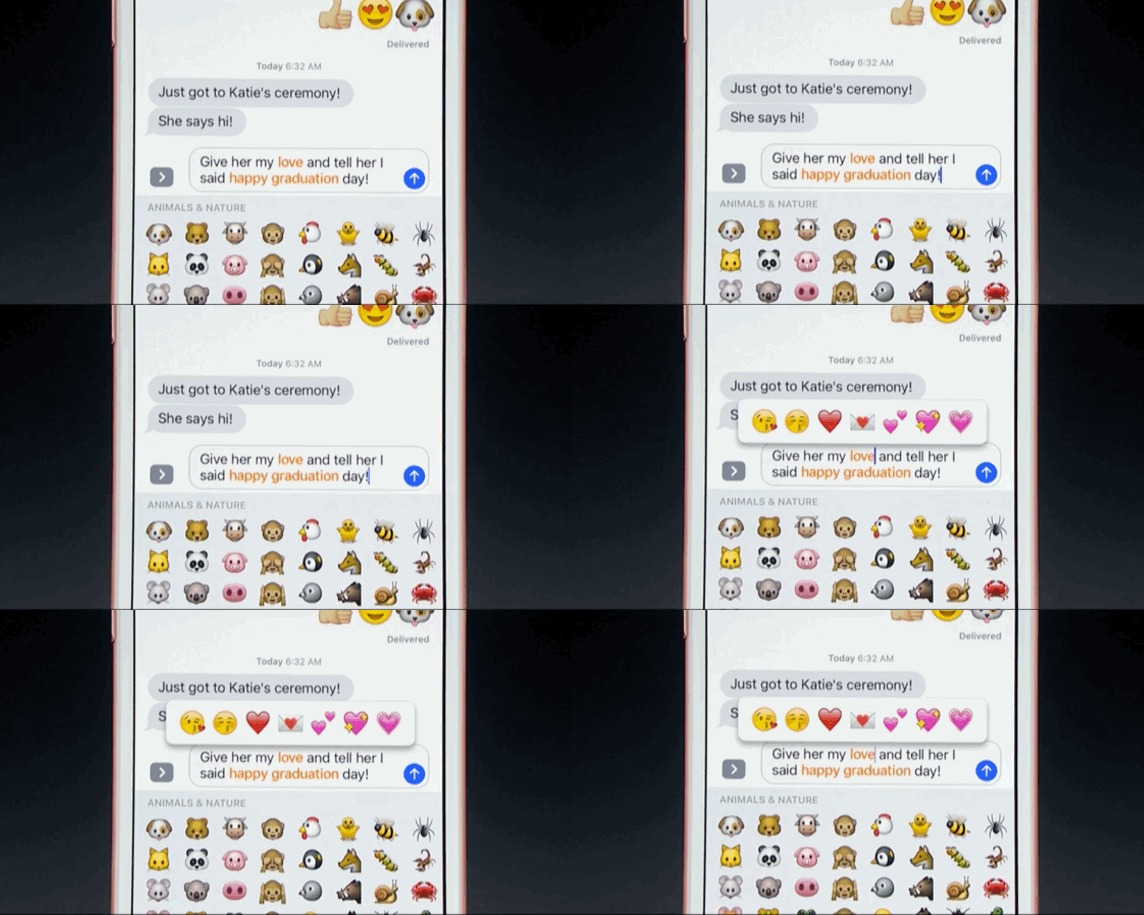
iOS 10 suggests emoji
  • Updated iMessage app will be able to suggest emoji, send a range of new playful messages, and is open to third party apps for paying and shopping within messages
  • Siri will be opened up to third-parties, giving it the power to send a WhatsApp, order an Uber, and so on
  • Alongside a revamp for stock apps such as iMessage, Maps and Photos, users can now delete the default apps to save homescreen real estate 
  • Apple Music has been rebuilt with a cleaner, more intuitive design that takes cues from the old iTunes app and Spotify
  • Other functions include the phone lighting up to display notifications when you pick it up, and widgets for the lock screen
This is "the biggest iOS release ever for our users," said Craig Federighi. He notes there are 10 major new features in the new OS. The highlights include a redesigned lock screen with rich notifications, quick interactions with apps, and expanded use of 3D Touch. - A new "Raise to wake" feature will, as the name suggests, wake the phone's lock screen when it's lifted to give you an overview of notifications and updates. The new notifications look significantly different and, with the use of a 3D Touch, you can respond to and interact with the app sending them immediately. This is very much in line with what Google's been doing with Android.
- The expansion of 3D Touch on the home screen includes widgets for apps that don't require you launching the app at all. You'll be able to see things like the latest sports scores with the ESPN app, and even get into video highlights, without entering the app proper.

macOS

    Siri comes to macOS for the first time
  • Macs have full Siri integration in the renamed macOS, including file and internet search, and the ability to play music and make calls
  • Apple Pay comes to the web, meaning that you can pay for things in Safari using your iPhone's TouchID or Apple Watch, which can also be used to unlock your computer
  • Greater integration with other Apple devices through an iCloud Drive update, and new Universal Clipboard feature
The latest OS version will be called Sierra, with a focus on continuity. For example, if you’re wearing an authenticated Apple Watch, you can automatically unlock your laptop just by having that watch nearby. It’s a neat little feature… if you own all the right Apple gear.
There’s also Universal Clipboard which lets you copy text from your iPhone and paste on your Macbook, and an iCloud Drive to help offload older files to make room for local documents.
OS X Sierra brings Apple Pay to desktop as well, with a new payment feature that lets you authenticate the payment through your Apple Watch or iPhone via continuity. Again, great for someone who has all the Apple gadgets.
A few more organizational updates bring tabs to any apps, picture-in-picture capacity, and – yep – Siri on desktop. She’ll be available right on the dock.

Apple Watch, watchOS 3


Apple Watch gets a writing feature called Scribble
Apple Watch gets a writing feature called Scribble Credit: Getty
  • Apps on the Apple Watch will update automatically in the background, meaning they will open seven times faster than they currently do
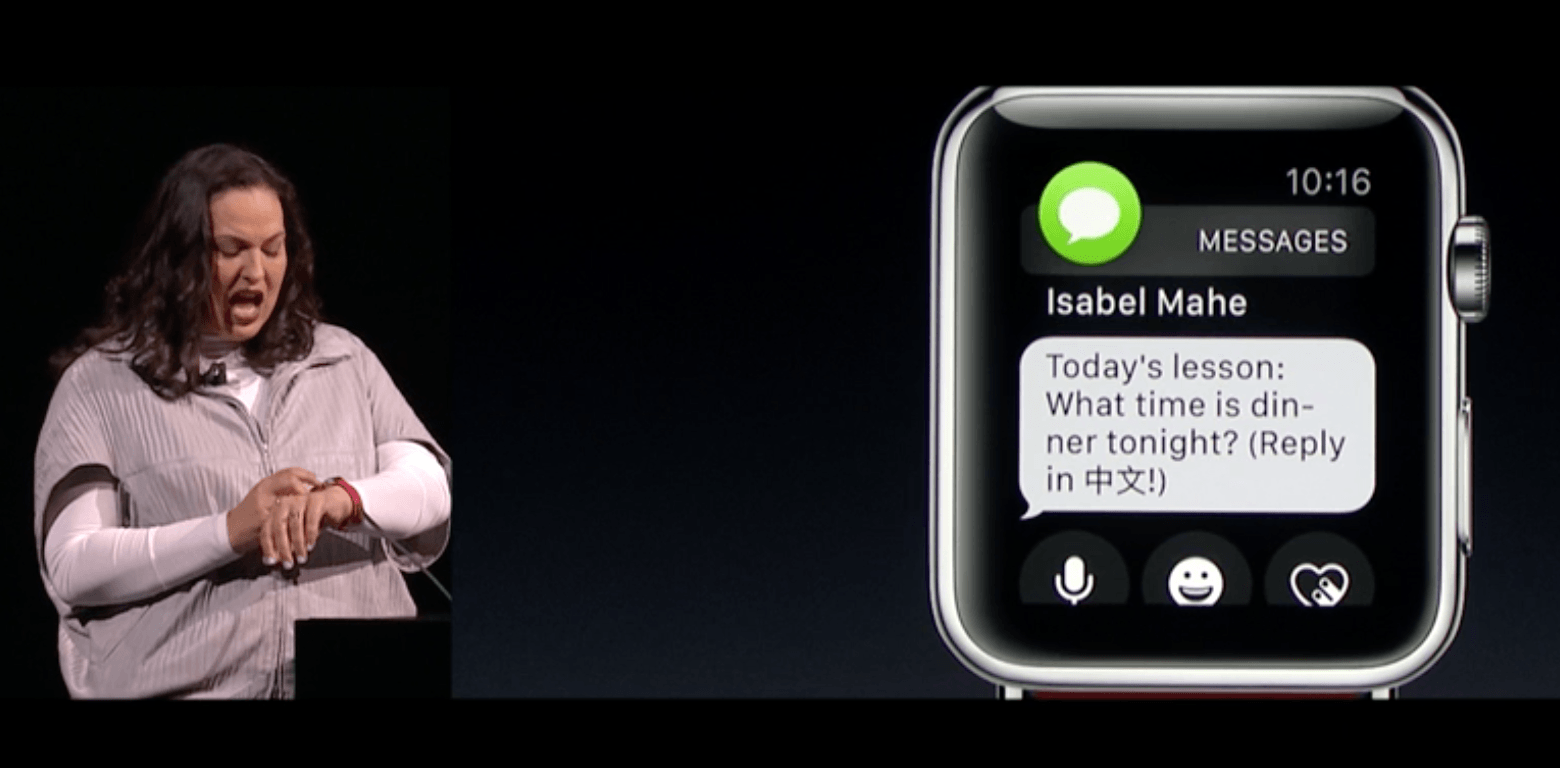
  • "Scribble" means you can now reply to messages on the Watch screen by writing out each letter at a time
  • The Watch interface and apps will also get updates, and will support Apple Pay
watch os scribbleThe Apple Watch is the company’s latest hardware pillar, so it’s no surprise that it started the keynote with this platform. In an upcoming watchOS 3 update, app load speeds are up to seven times faster, and there is a new dock feature and control center like on iOS.
There are also new quick reply buttons with pre-written responses, as well as “Scribble,” a handwriting support app. It even works in Chinese!
In case of emergencies, there’s now an SOS mode that allows you to hold the side button to call 911. If you’re in an international city, holding SOS will also call the correct local emergency number (i.e. 999 in Hong Kong).
There are several new health apps as well, such as a breath meditation program and a wheelchair-friendly mode to promote regular exercises for handicapped users.
Oh, and Minnie Mouse is now available as a watch face in addition to Mickey from last year. Innovation, y’all.
The update is coming for free to general consumers this fall.

Apple TV , tvOS


Apple TV apps sync automatically with other Apple devices
  • Apple TV can now be controlled using an Apple TV Remote app, and an MFi game controller in addition to the Siri Remote
  • Enhanced search through Siri
  • Dark mode for the menu screen
  • Single sign-on for Apple TV and the apps saved to it
Screen Shot 2016-06-13 at 1.36.08 PM“The future of TV is apps” That what Eddy Cue, Apple Senior Vice President of Internet Software and Services said about Apple’s tvOS at last WWDC, when it introduced third party development on the device. The platform has since increased its video channels offerings from 80 to 1,300.
With this year’s update, there will be a new remote app in case you misplace the physical remote or need more remotes for multi-player games.
If you hate syncing your cable account to access live TV or video on demand on the Apple TV, the new tvOS has a single sign on mode that lets you log in once to access all the channels available from your cable provider.

Swift Playground

Screen Shot 2016-06-13 at 2.51.48 PMYou didn’t think we’d get away with WWDC without mentioning Swift, right? Apple introduced Swift Playground, a new iPad app to help kids learn how to code in Swift right from the iPad. The game-like app lets you learn different principles, like loops or turning specific features (such as gravity or gyroscoping) on and off.
Cook thinks it will help make learning more accessible to millions around the world, but of course that’s provided you can afford to buy an iPad to start.
Swift Playground will arrive with the developer preview today, and will arrive with the public beta and general public with the same timeline as iOS 10. The app will be free to download.

Photos, Maps, Music, News, Home, Phone

For Photos, you’ll be able to see a map-view of where your photos were taken Instagram-style, and Apple will incorporate facial recognition to sort through who’s in your images, Google Photos-style. It’ll also start creating movies based on photos you took during a recent period of time, if you’re into that kind of thing.
Screen Shot 2016-06-13 at 2.08.26 PMWith Maps, there are new recommendation shortcuts for you to find exactly what you want from Maps, such as cuisine types in a restaurant search mode. You can also search for nearby stops on a map route such as a gas station or restaurants and see how long it’ll take to detour over there.
Maps will be open to developers, too. For example, now you can book your dinner reservation from the map through a third party app like OpenTable, then book a ride to go there all via Maps.
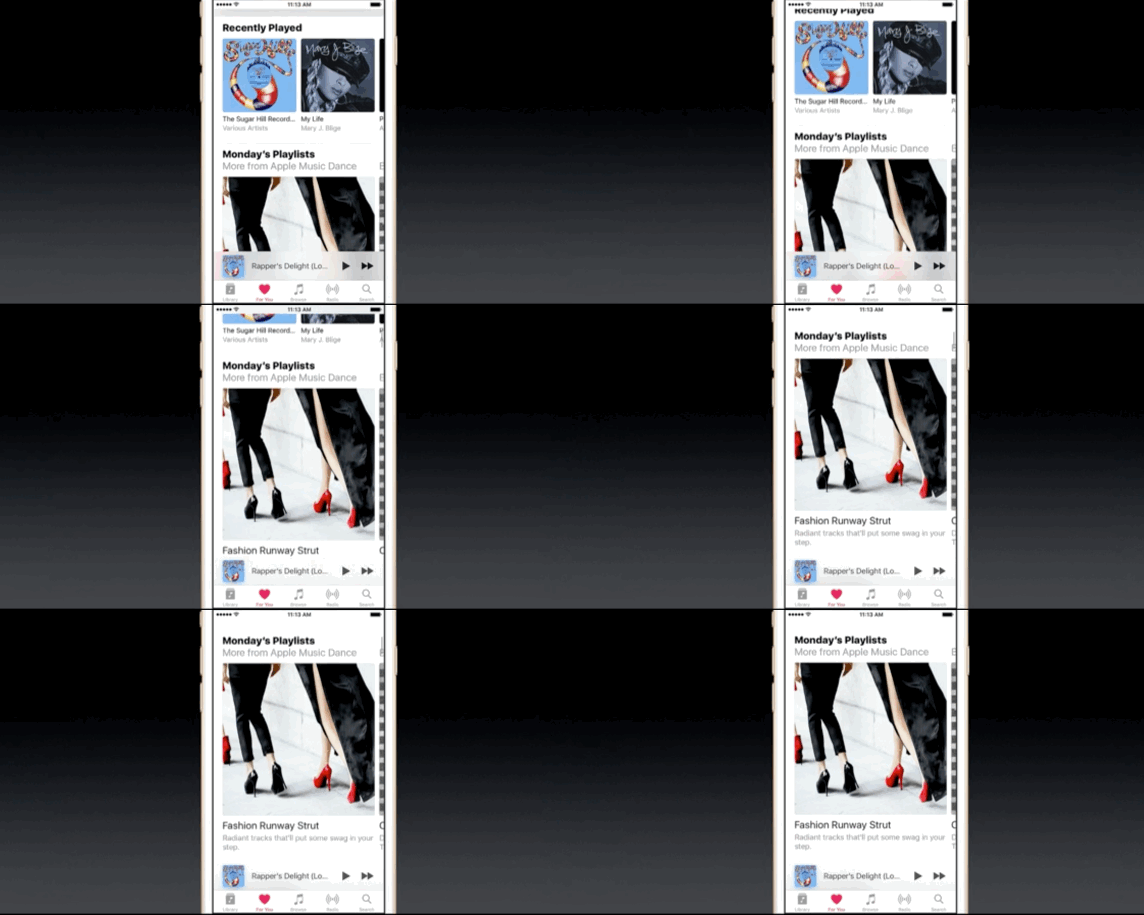
apple music revampFor Music, Eddy Cue says it will get redesigned from the ground up with larger photos, and better tabs to find music you’ve recently added or music you’ve downloaded. There’s a lyrics tab and a daily-curated playlist too, Spotify-style. Hmm, looks like there is an ongoing trend for this keynote.
News gets a redesign too, which shares the same aesthetic as the new Music look with the giant font to separate each sections. You can now subscribe to newspapers and magazines from the News app as well.
Ck2dVp1WEAErOZzHomeKit gets a new Home app so you can control all your internet of things gear. You can even say good morning to Siri so she can set the house ready for you to get going. If someone rings a doorbell, you can get a notification, view a livestream of the front door, and unlock right from the homescreen.
And get this: If you’re the kind of person who uses your smartphone to actually make phone calls, now you can get voicemail transcriptions! Third party providers can also help detect spam phone numbers to avoid picking up annoying calls. VoIP can be integrated into the lockscreen, too.
emojificationiMessage gets a fun update with invisible ink, letting users tap to unblur a new photo or text. There are new text stylizations that lets you add animations as well, such as “smash,” “gentle,” or “loud.”
Emoji get supersized too – three times bigger in fact – and iMessage can recommend emoji to use or turn all your words into an emoji. What a time to be alive.
As you may have anticipated by now, Messages are open to devs, too.
The developer preview for iOS 10 will be available today, and a public beta will come out in July. The public rollout will arrive in the fall.

The 13 biggest announcements from Apple WWDC 2016

The 13 biggest announcements from Apple WWDC 2016
Apple’s WWDC this year was full of incremental updates to OS’s for the Mac, iPhone, Watch, and TV, as well as moves to open up services like Siri and iMessage to developers. A lot of the changes were geared toward moving between Apple devices easier — Siri is now on desktop, and Apple Pay will now work on Safari, for example. There were also a bunch of redesigns: new notifications and lock screen interactions for iOS; a new command center for the (faster) Apple Watch; and changes to Apple News, Music, Maps, and other services. 


macOS - New Name , More Continuity Across Devices , Siri

WWDC MacOS OS X is now macOS, and this iteration will be called Sierra. The public beta will launch in July with the final version coming in the fall. One of the big focuses of the new OS is continuity across devices. Craig Federighi demonstrated a feature called Universal Clipboard, which allows users to copy and paste across multiple Apple devices. You can also save your Mac desktop to the cloud and access it from a different computer using iCloud drive. There are other smaller updates as well, including a storage-saving measure that moves old files to the cloud and a way to unlock your Mac using your Apple Watch.
Sierra will also bring Siri to the desktop. Siri will be accessible in the dock as well as in the top-right corner near Spotlight. You’ll be able to use voice commands to find files, search the web, send messages, and other standard Siri functions.

Apple pay is coming to the web

WWDC Apple PayYou’ll be able to use Apple Pay to make payments online through Safari. Authentication will work through TouchID, either through your phone or Apple Watch, eliminating the need to type credit card details. Apple Pay is available in the US, UK, Canada, Australia, and Singapore, and will be rolling out to Switzerland, France, and Hong Kong.


The apple watch gets faster and ADDS new features

 watchOS 3 brings a host of updates, but perhaps most importantly, it loads apps seven times faster than the previous OS, thanks to background refreshing and keeping apps stored in memory. Navigation supposedly will be easier on the new OS, too. The side button can be used to access a "dock," which allows wearers to scroll through their apps, and the Watch will act a little more like an iPhone with a new Control Center. A swipe up on the Watch allows wearers to quickly switch into airplane mode or Do Not Disturb, just like the iPhone.
Other new features include a keyboard called "Scribble" that wearers can use to respond to a message. Instead of typing or dictating a response, they can draw out each individual letter. It works in either English or Chinese. Apple Watches will also come with a new SOS feature, which activates when the side button is held down and calls 911 and sends location information to first responder and emergency contacts. It'll also share users' medical ID, which displays their allergies, age, and existing medical conditions. The feature works internationally and will call country-specific emergency numbers, so long as the watch is tethered to a phone or is connected to Wi-Fi.

Apple emphasized fitness with the introduction of new activity-specific watch faces, a meditation app called "Breathe," and activity sharing to view friends' fitness levels.
 

iOS gets a slew of updates


Craig Federighi called the iOS changes "the biggest iOS release ever for our users," including complete redesigns for Music and Maps, new notifications, and an expanded role for 3D Touch. A new feature called "raise and wake" will wake the lock screen when you lift your phone, revealing redesigned notifications that you can interact with using 3D touch.

Apple news gets a redesign and supports subscriptions

Apple WWDC 2015 EYNTKApple News now features over 2,000 publications and over 60 million monthly readers. Apple is rolling out an all-new design that features clear sections, including Top News, Trending, and Sports. The app pulls together new sections based on your reading habits, and includes a Featured Stories section with editor picks. Apple News now also features subscriptions, which means you can subscribe and read full newspapers and magazines from the app. It will also send breaking news notifications and deliver them to your lock screen.

Apple music gets a discover playlist and a complete redesign


WWDC 2016 MusicAfter only a year of existence, Apple Music is getting a complete redesign. New sections make it easier to navigate, including one section for downloaded music and another for recently added songs and albums. Apple also appears to be coming directly for Spotify with its new "discovery mix" that tailors a playlist to listeners’ tastes. There will also be daily curated playlists and new sections to help users find new music curated by Apple’s music editors. You can also read song lyrics now.


Maps is Redesigned with Navigation in Mind


WWDC MapsMaps is getting a whole new feel. Its redesign will show more of a map when a user opens the app. Users can also book rides through Maps, pay for them with Apple Pay, and make restaurant reservations. Navigation is getting easier too, with directions that include traffic. Maps is also coming to CarPlay, which will show traffic and offer alternative routes, as well as precise navigation right from a car’s display.

Messages Get snazzier

WWDC Messages
Apple is revamping iMessage to include bigger emoji as well as suggestions for turning certain keywords into emoji. People can share songs directly from Apple Music and write notes to one another in their own handwriting. There are animated effects — like strobe lights, balloons, and confetti — and invisible ink hides messages until they’re swiped over. Invisible ink! Developers are also getting access to Messages and can develop apps like stickers. iMessage is turning into some kind of Snapchat-WhatsApp-Facebook Messenger conglomerate.

Photos takes on google photos


WWDC Photo

Photos is being updated with new features to help you organize and manage your collection. You can organize your collection automatically by person using facial recognition. The app is also adding Memories, which bundles together photos according to events and locations. You can also create a montage set to music automatically from Memories, much as you’re able to do in Google Photos.


Voicemail transcription comes to iOS 10

WWDC VoicemailiOS 10 will now feature voicemail transcription, which will automatically transcribe voicemails and offer them up like texts. In addition, iOS is taking on spam calls: the iOS will support APIs that can alert you to possible spam calls and warn you before you pick up. With VoIP, you’ll be able to see caller ID right on the lock screen.

tvOS is all grown-up


WWDC TVtvOS is less than a year old but now hosts 1,300 video channels and over 6,000 apps. That library is going to be expanding shortly: Dish’s Sling is coming to tvOS today; Fox Sports Go is coming later this summer; and Molotov, a French TV service, is coming next month. Apple is rolling out a new Apple TV remote app, which will have all the functionality of the... Apple TV remote. You’ll be able to use touch for navigation, Siri for voice command, and the phone’s built-in sensors for gaming control. Plus, you’ll have your trusty keyboard. Siri will now be able to search through the service’s 650,000 movies and shows, as well as live channels by name or category ("German high school comedy from 1962, please"). You’ll also now be able to use Siri to search in YouTube.
Apple’s also introducing a single sign-on system that lets your log into all of the network apps at once. You’ll have a page that shows you all the channels you have access to. Download a channel app onto your phone, and it’ll automatically appear on your tvOS. Seamless integration, folks.
And Apple quickly introduced two kits for developers: ReplayKit, which lets you live broadcast gameplay or save it for later, and HomeKit, which will let you control all the devices in your house, including tvOS. tvOS will roll out in a free upgrade this fall.

Siri is opening up to app developers


Siri, which now services over 2 billion requests per day, is now opening up to developers. That means you’ll be able to ask Siri to send a message through WeChat, ask it to call an Uber, search for photos on Pinterest and start and stop your workout apps all with voice command.

What's next

WWDC was packed with updates, many of which seem minor on their own, but taken together could make it easier navigate Apple’s ecosystem. With the Watch, incremental changes in speed and the command center could go a long way toward making it a more appealing device, and the new HomeKit hub could make connected appliances more attractive. It remains to be seen how well all these services work outside the Apple ecosystem, and whether opening up things like Apple Pay and Siri will be enough to surmount the lead of companies like Amazon, which has been aggressive about forming partnerships and developing frictionless ways to purchase. And of course, we’ll still be waiting for the Apple car.

Microsoft buys Social Networking site LinkedIn for $26.2 billion

Microsoft buys Social Networking site LinkedIn for $26.2 billion
Microsoft buys Social Networking site LinkedIn

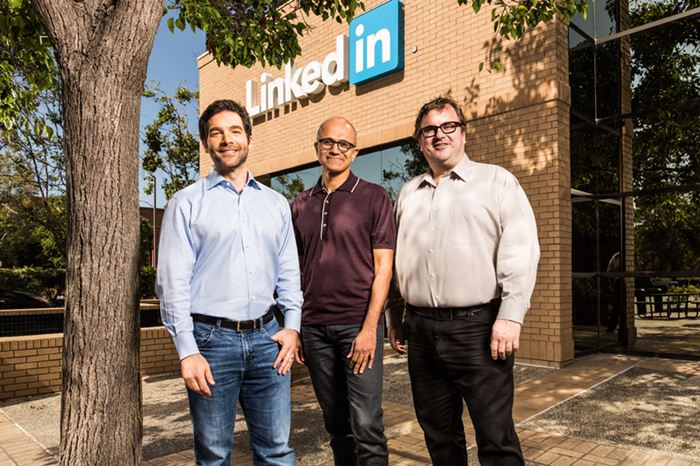
Huge news at the start of the week. Microsoft to buy Linkedin for $26.2 billion in cash. Jeff Weiner will remain the CEO of Linkedin, reporting to Satya Nadella, CEO of Microsoft.
Microsoft has decided to buy social-networking site Linkedin in a cash transaction for $26.2 billion and it is the biggest deal ever so far from Microsoft corporation. The company announced that it has reached an agreement for the purchase of LinkedIn. The social network for professionals should be acquired for a total of US $ 26.2 billion, about $ 196 per share.
Microsoft buys LinkedIn for $26.2 billion
Linkedin was founded in the year 2002 and has approximately 400 million users. Linkedin comes under the list of social network, but its main purpose is to find professionals and work connections. Users in Linkedin can create the profile and later they can share their resume in order to find the job.
According to the sources, LinkedIn will retain its distinct brand, culture, and independence. Jeff Weiner will remain CEO of LinkedIn, reporting to Satya Nadella, CEO of Microsoft. Reid Hoffman, chairman of the board, co-founder and controlling shareholder of LinkedIn, and Weiner both fully support this transaction. The transaction is expected to close this calendar year.
Satya Nadella the CEO Of Microsoft said “The LinkedIn team has grown a fantastic business centered on connecting the world’s professionals. Together we can accelerate the growth of LinkedIn, as well as Microsoft Office 365 and Dynamics as we seek to empower every person and organization on the planet.”
Jeff Weiner the current CEO Of Linkedin said “Just as we have changed the way the world connects to opportunity, this relationship with Microsoft, and the combination of their cloud and LinkedIn’s network now gives us a chance to also change the way the world works. For the last 13 years, we’ve been uniquely positioned to connect professionals to make them more productive and successful, and I’m looking forward to leading our team through the next chapter of our story.”
Reid Hoffman who is one of the co-founder and executive chairman of Linkedin said “Today is a re-founding moment for LinkedIn. I see an incredible opportunity for our members and customers and look forward to supporting this new and combined business,I fully support this transaction and the Board’s decision to pursue it, and will vote my shares in accordance with their recommendation on it.”
Last year LinkedIn recorded a tremendous increase in the number of active users, which consists of 105 million active users per month, recording overall 433 million registered users.